The app announced this feature earlier this year, and now all users will be able to control how their profile content is displayed.
After announcing the return of this feature in January, Instagram has finally released the ability to rearrange posts in the profile grid, giving users more control over how their content appears in the app.
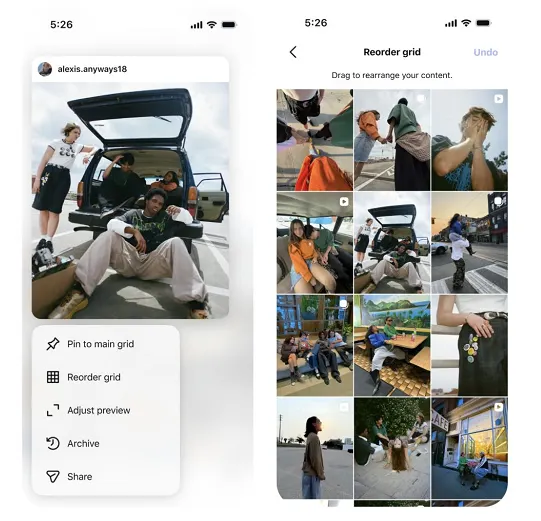
The update will provide Instagram users with an easy way to change the layout of content in their profile, helping to highlight the best material for profile visitors.
As Instagram explains: “With the new ‘Rearrange grid’ feature, you can now move content around on your main profile grid, which is perfect for highlighting your best work or making your profile feel more personal.”
For creators who regularly publish content, this feature will become an additional profile customization tool. This is especially relevant for those who actively work with posts and the visual style of their page. Learn more: What do you call a person who writes posts on Instagram
This option is available in the feature list that appears after tapping any post on the profile page.
“Just go to your profile, tap and hold any post in the grid, select ‘Rearrange grid’ from the pop-up menu, then tap, hold, and drag the content to where you want it,” Instagram reports. “Your changes are saved instantly and are visible to anyone who visits your profile.”
Instagram has hinted at adding this option for many years, with the first testing of this feature spotted back in 2022. But it seems IG moved away from the concept in favor of a grid redesign with larger thumbnails that better suit vertical content. Instagram rolled out that update in January 2025.
Previously, many users could only edit the content of their posts after publishing, but not change their placement in the profile. You can read more about this here: Is it possible to edit an Instagram post after publishing
Now users will have more ability to regroup and reorient their profile according to what suits them best.
The update will give content creators more ways to customize their Instagram profiles, which could be a valuable tool for attracting visitors. At the same time, it will also allow those who built their profiles based on the old format to rearrange their posts accordingly.
When working with a profile, users often experiment not only with the placement of their own posts, but also with different formats of interacting with others’ content. For example: How to add someone else’s post to your Instagram feed
There are many ways to use this feature, adding another aspect to overall Instagram account management.
For those who publish content not only from their smartphone but also through a browser, this guide may be helpful: How to create a new Instagram post from a computer
It is also worth considering the platform’s current rules, as individual posts may be subject to Instagram’s algorithm restrictions. Learn more: Instagram posting restrictions: why posts get blocked
The update is starting to roll out to all users on the latest version of the app, starting today.
After changing their profile structure, users may want to evaluate the performance of individual posts and return to previously saved content. In this case, this guide is useful: How to view your likes and liked posts on Instagram